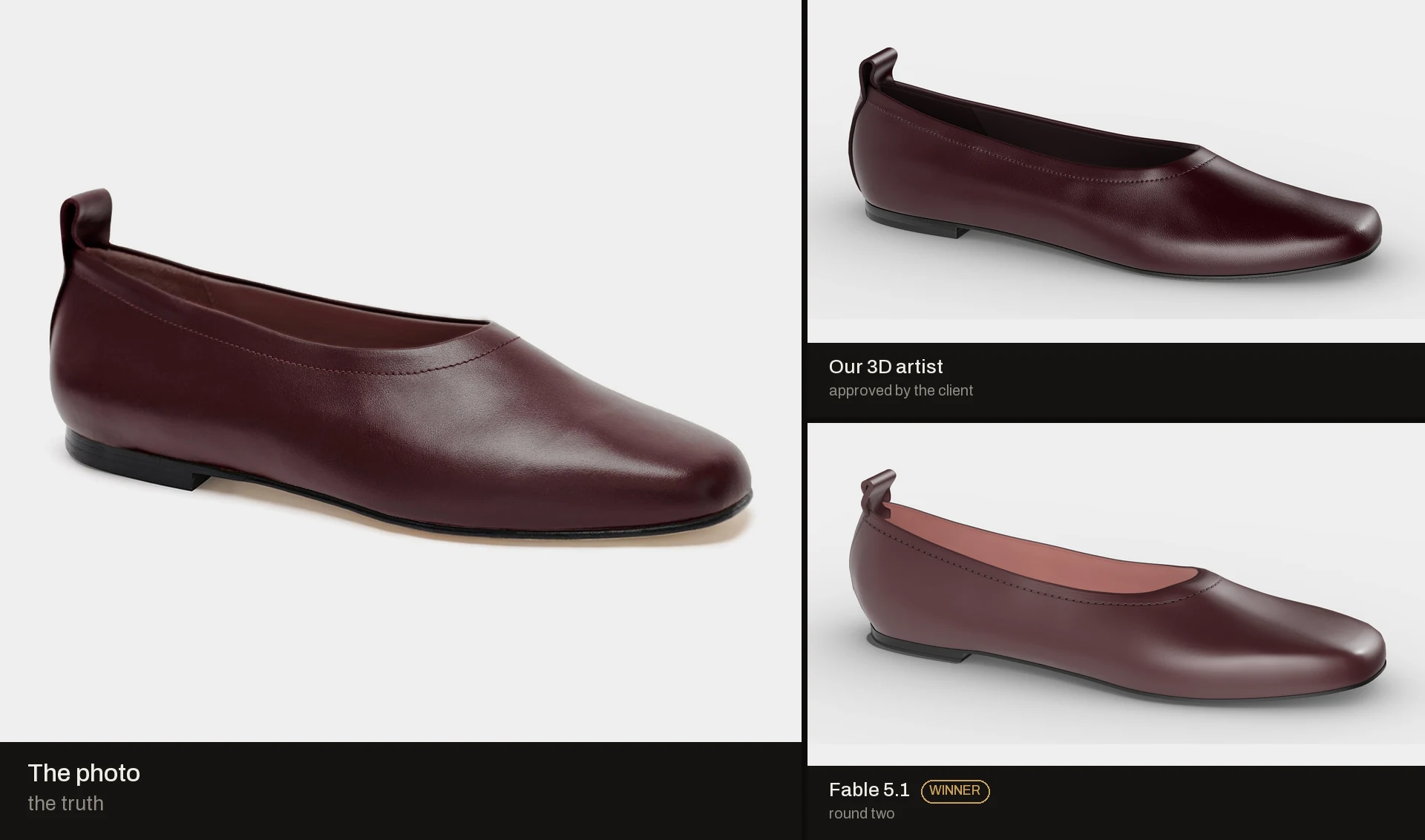
Four photos, no CAD
In episode one the AI had the maker's CAD file. The geometry came for free. Most brands we talk to have no CAD. They have a product page. So this time the input is what a real client sends: four photos, the overall size and a short spec.
The product is a women's leather ballet flat in burgundy, EU 38. It comes from a brand we talk to, and we leave the brand out. Round toe, low topline, a 5 mm heel and a small pull tab. It looks simple. It is not. You read a flat from its curves and its leather. Both are hard to see in a photo.
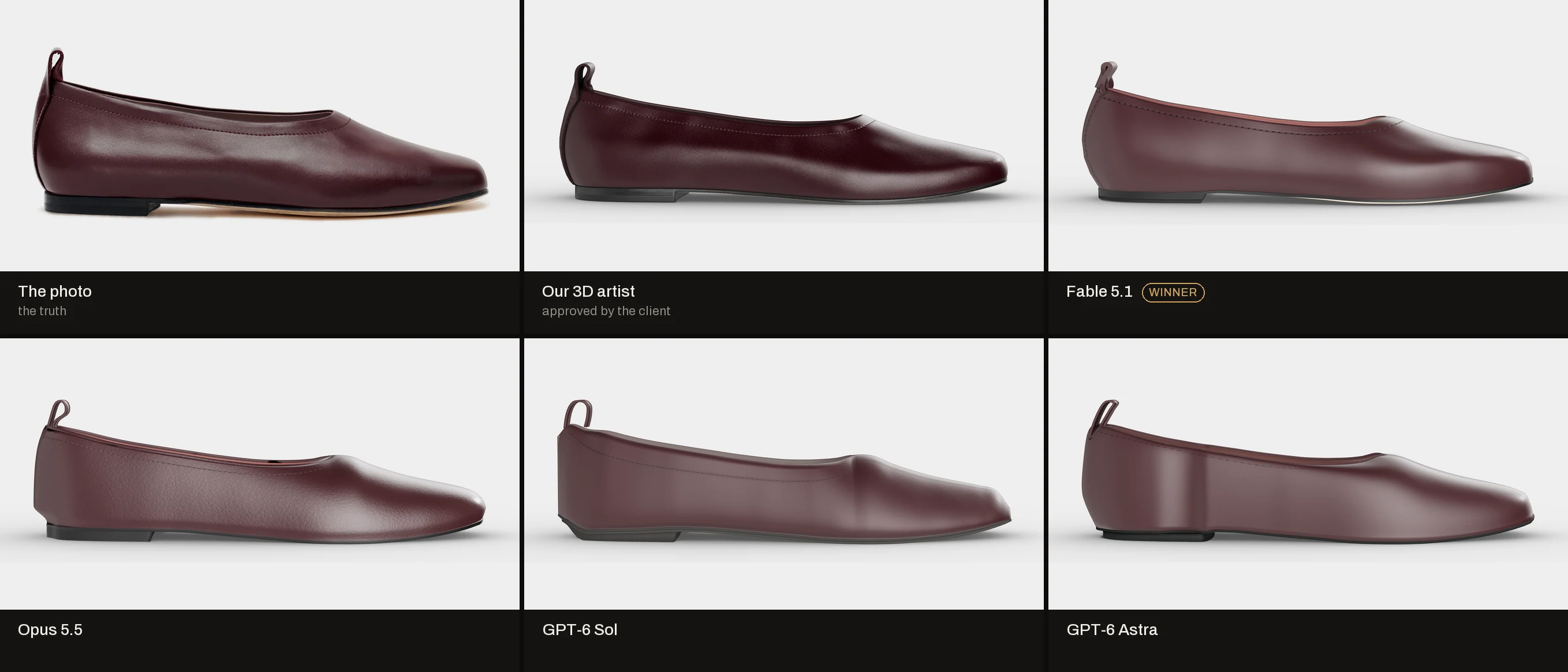
Our 3D artist built this shoe from the same photos. The client approved it. That model is our second judge.
Four AI models got the job: Opus 5.5 and Fable 5.1 from Anthropic, GPT-6 Astra and GPT-6 Sol from OpenAI. Same brief, same machine, same start. Blender only, all in code. No web, no downloads, no 3D generators. The job also asks for a colour configurator with six colours that works on a phone.
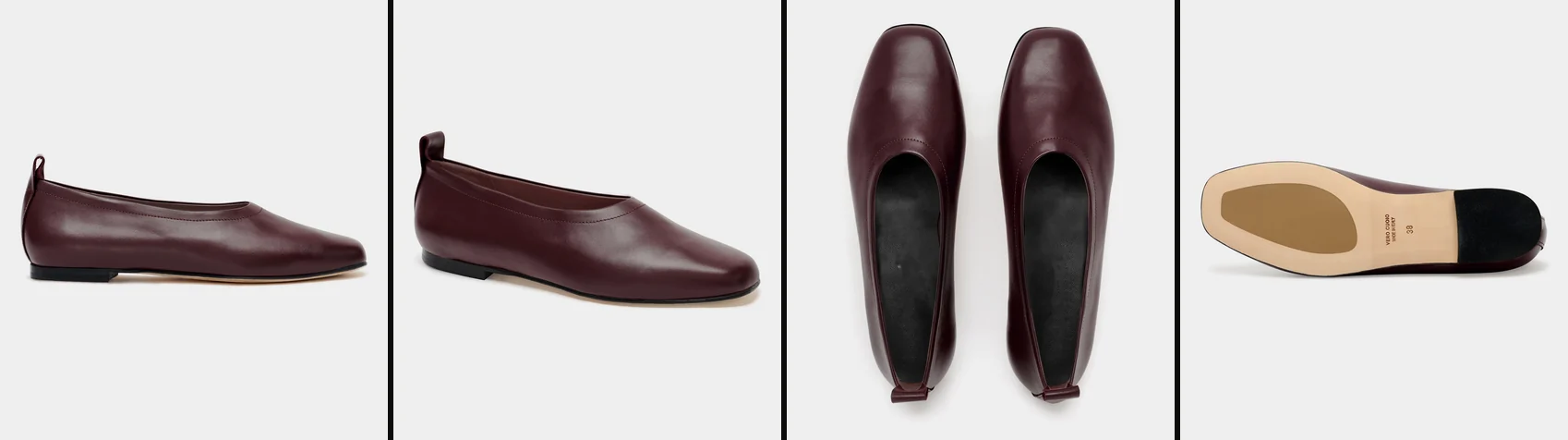
The photos are the judge
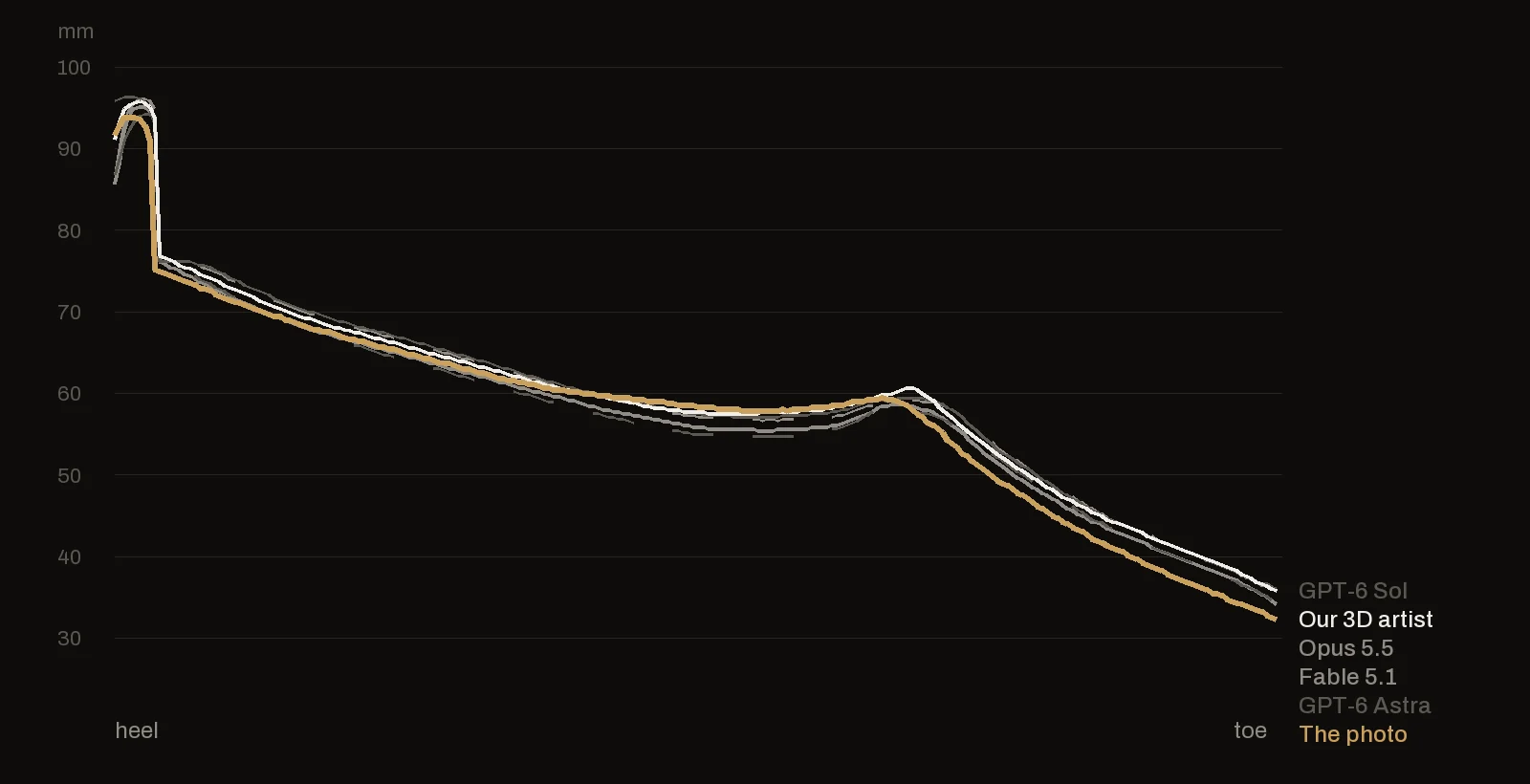
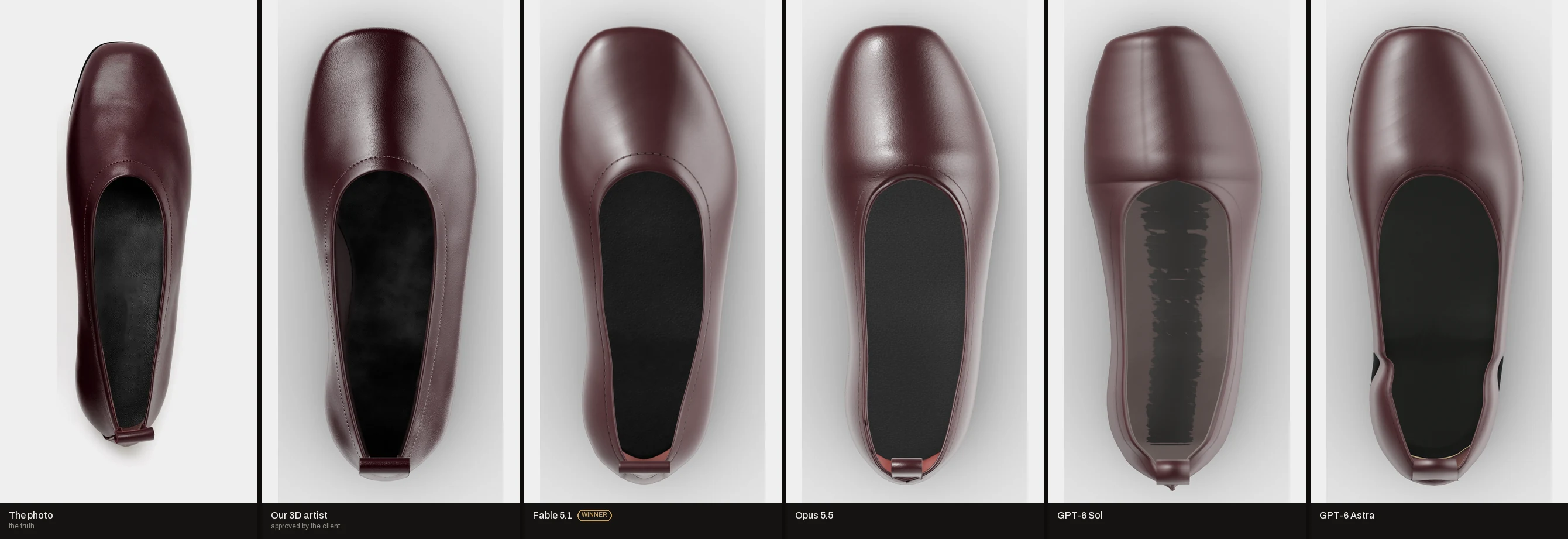
Without CAD there is no exact answer. The photos are the truth. So we measure every model against them first, ours included. From the side we compare the outline and the height of the top edge, millimetre by millimetre. From above we compare the outline and the opening, the dark shape where the foot goes in.
A photo has limits: perspective, shadow and a lens. The pair in the top photo shows how far that goes. The left and the right shoe match each other at 0.965 on the outline and 0.79 on the opening. The pair sets a rough ceiling. A score near those numbers is as good as a photo can tell.
Then we check against our artist's approved model. We compare the outline from three sides and the average gap between the two surfaces in millimetres.
Every 3D image here comes from our artist's own 3D scene: the same light, the same studio and the same camera for every model. We match the camera to each photo, so each 3D image stands next to a photo taken from the same angle.
Round one: the shape, and nothing on it
0
textures, across all four deliveries.
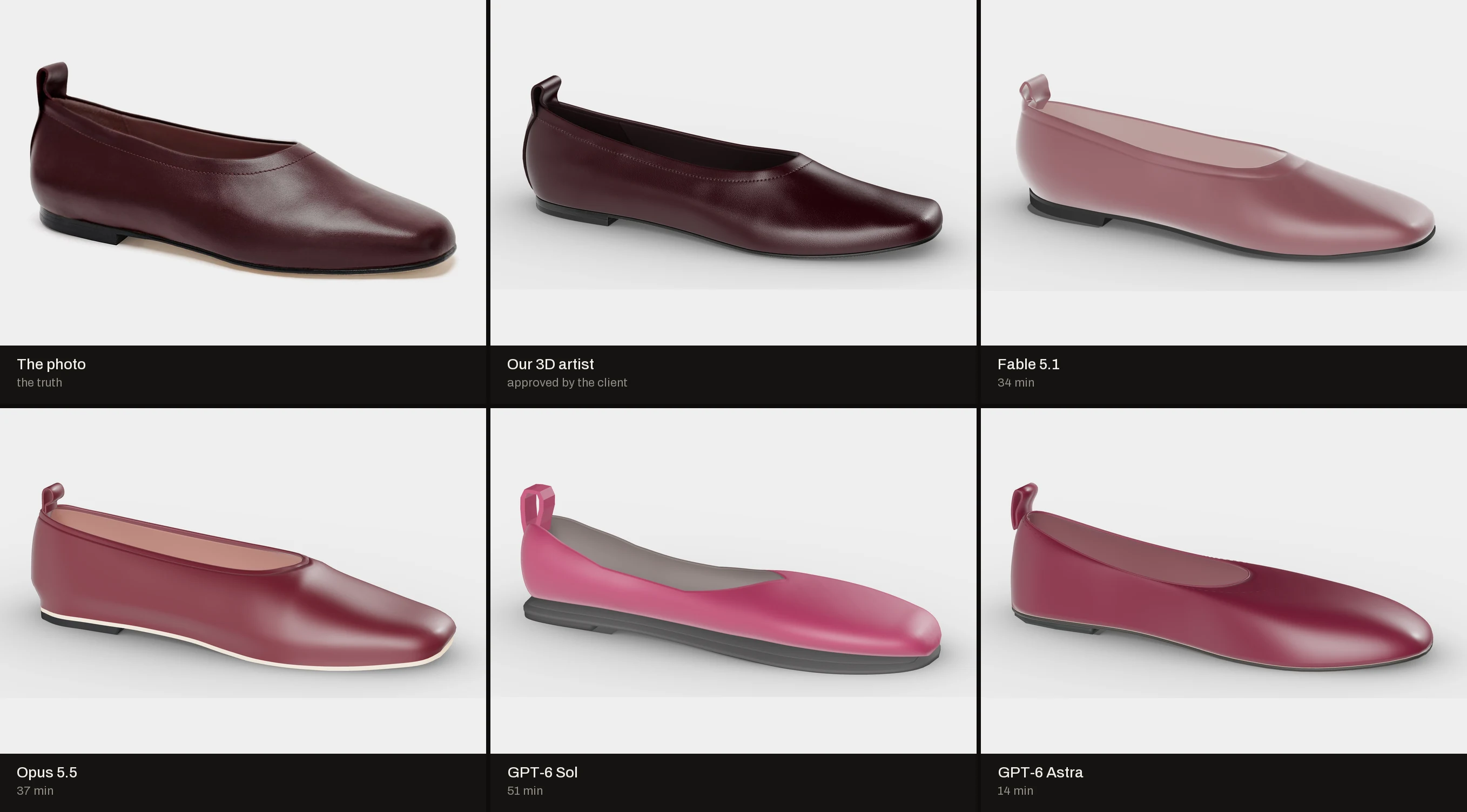
All four delivered a shoe in Blender, a web file and a working configurator with six colours. GPT-6 Astra took 14 minutes. Fable 5.1 took 34, Opus 5.5 37 and GPT-6 Sol 51.
Two shapes came close. Against the side photo, Opus 5.5 and Fable 5.1 beat our own model (0.974 and 0.967 against 0.955). They measured that one photo pixel by pixel, and it shows.
Two shapes were bad. GPT-6 Sol put the sole out like a platform and laid the toe flat on the floor. GPT-6 Astra cut the opening short, dropped the top edge by up to 12 mm and drew the stitching across the front of the shoe. Fable's file carried a white sheen that washes the leather out in a standard viewer. Its own page did not show it.
And every shoe looked like plastic. No grain, no stitch line, no stamp on the sole. One flat colour per part. The reason sits in our brief. It asked for materials, never for textures. We did not think we had to ask. They built what we measured. Our mistake, and the lesson of this round.
Round two: we wrote back like a client
A client does not say try again. A client sends notes. So we measured each shoe and wrote to each model on its own: what we found, in millimetres, and what we want to buy.
Every model got the same package:
- Its own findings, with numbers. Fable's rim sat 3 to 5 mm too high. Opus's toe was too square. Astra's stitching sat in the wrong place.
- A measurement sheet of our approved model: 25 cross-sections along the shoe, the toe spring, the heel and the leather colour.
- A gauge they could run themselves. We use the same script to accept the work.
- Twelve close-ups cut from the same four photos: stitching, the pull tab, the toe, the stamp on the sole.
- A way of working: shape first, until the gauge passes. Then the surface: UV maps and real textures, drawn in code.
What this changes: from round two on, the models work from our artist's numbers, not only from the photos. That is how a real job runs. The client sends feedback. But this is no longer a photos-only test.
All four passed
1.57 mm
average gap between Fable 5.1's shoe and our artist's. GPT-6 Astra has the widest gap: 2.30 mm.
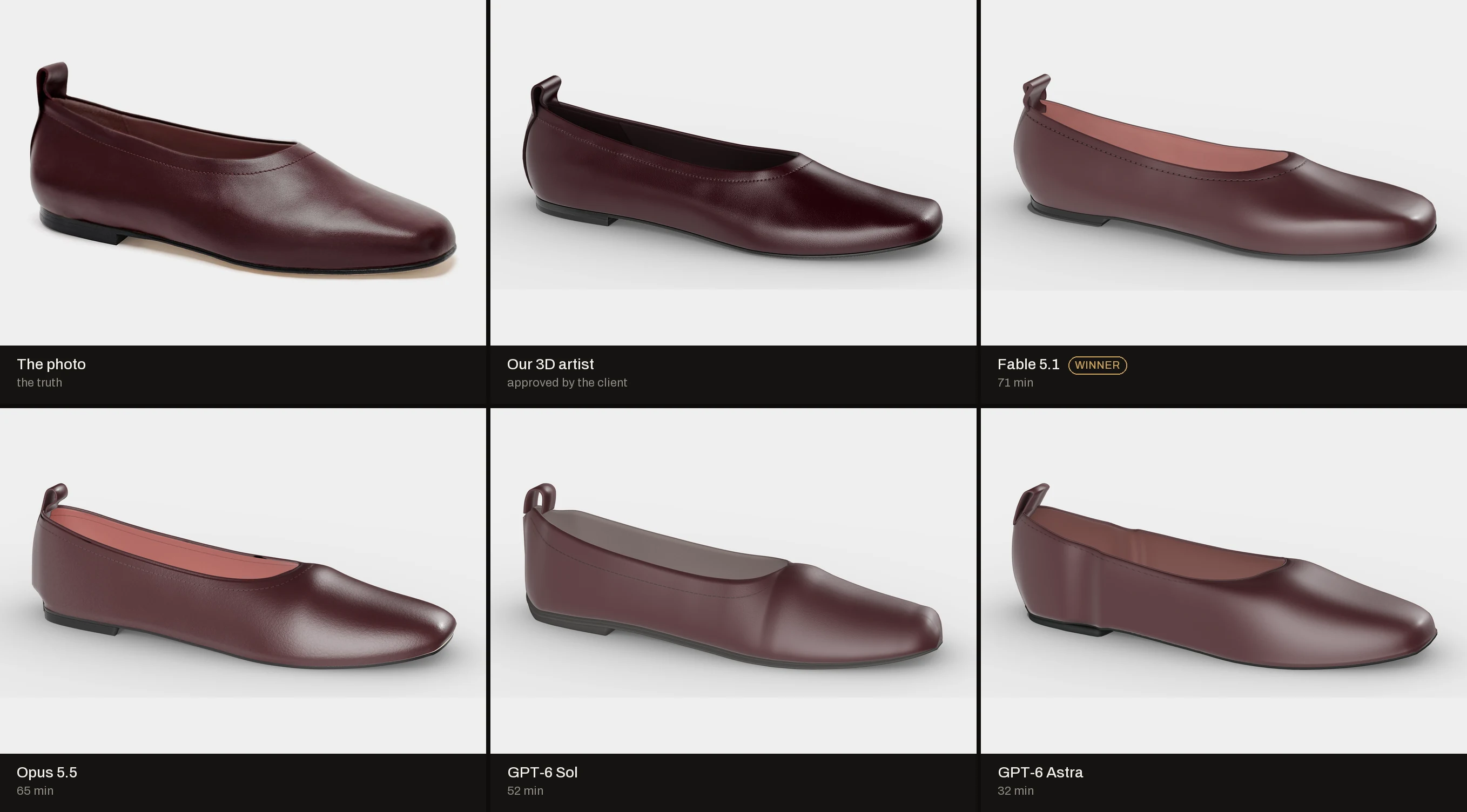
Every model ran the gauge, fixed the shape and passed. Then each drew its own textures in code: a grain for the leather, a stitch line around the opening and the stamp on the sole, VERO CUOIO, MADE IN ITALY, 38. Round two took 32 to 71 minutes.
Against our artist's model the outline match rose for everyone. Fable 5.1 went from 0.927 to 0.969. GPT-6 Sol made the biggest jump, from 0.840 to 0.951.
Between the measured points the models interpolate, and the interpolation is not perfect. The sheet gives 25 cross-sections. Between them each model guesses the curve. The front view stays the weakest for all four, from 0.88 to 0.93. No photo shows the front, so the shape of the toe box is a guess.
Back to the photos
Now the real test. We put every model back against the four photos, our artist's too. The best AI shoe matches the photos as well as ours does.
One detail tells the story. In round one, Opus 5.5 and Fable 5.1 read the side photo on their own. They matched its outline better than our model did. In round two they followed our artist's numbers, and their outline came back to our artist's level. They followed the client, even where the client and the photo differ by a millimetre or two. That is the right call, and it is why the client's numbers have to be right.
| Against the photos | Side outline | Top edge, avg gap | Outline from above | Opening |
|---|---|---|---|---|
| The photo pair, left vs right shoe | 0.965 | 0.79 | ||
| Our artist, approved | 0.955 | 1.7 mm | 0.905 | 0.81 |
| Fable 5.1 | 0.957 | 1.6 mm | 0.904 | 0.87 |
| Opus 5.5 | 0.943 | 2.2 mm | 0.899 | 0.79 |
| GPT-6 Astra | 0.947 | 2.1 mm | 0.900 | 0.76 |
| GPT-6 Sol | 0.933 | 2.1 mm | 0.903 | 0.79 |
How to read the graph
Each line is the top edge of the shoe seen from the side. It runs from the heel on the left to the toe on the right. The height is in millimetres above the floor. The spike on the left is the pull tab. The long slope is the opening, lowest at the waist. The bump is where the opening ends and the front of the shoe begins. From there the line falls to the toe. Gold is the photo. The closer a line stays to gold, the closer the shape. All five stay within 2 to 3 mm. Near the toe every 3D line sits a little above gold, ours too. That gap comes from the camera angle of the photo, not from the models.
How we measure: overlap is 1.0 when two outlines are identical. The photo's exact camera is unknown, so every model gets its best of eight side angles, ours included. Numbers are from round two.
Where it still shows: the leather
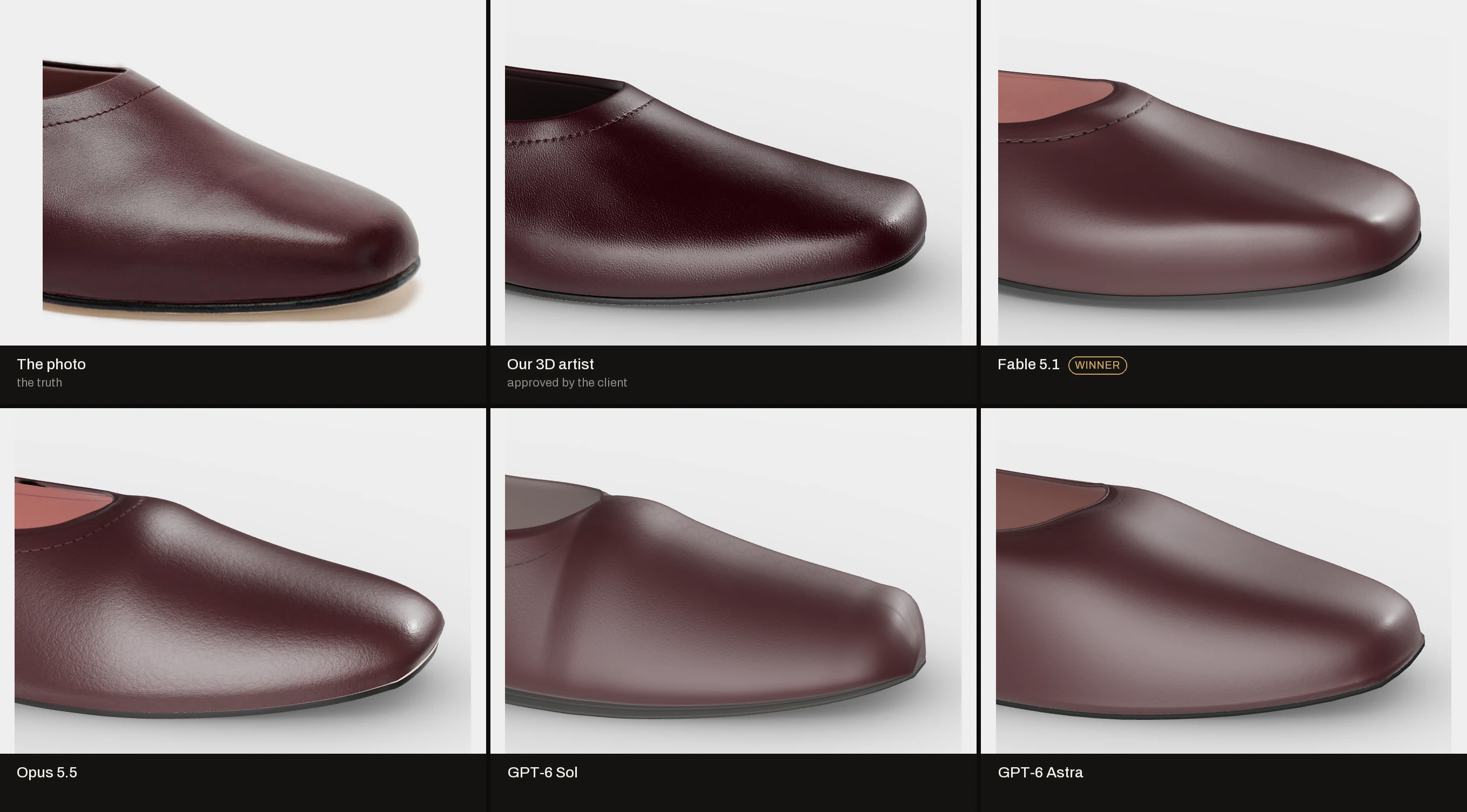
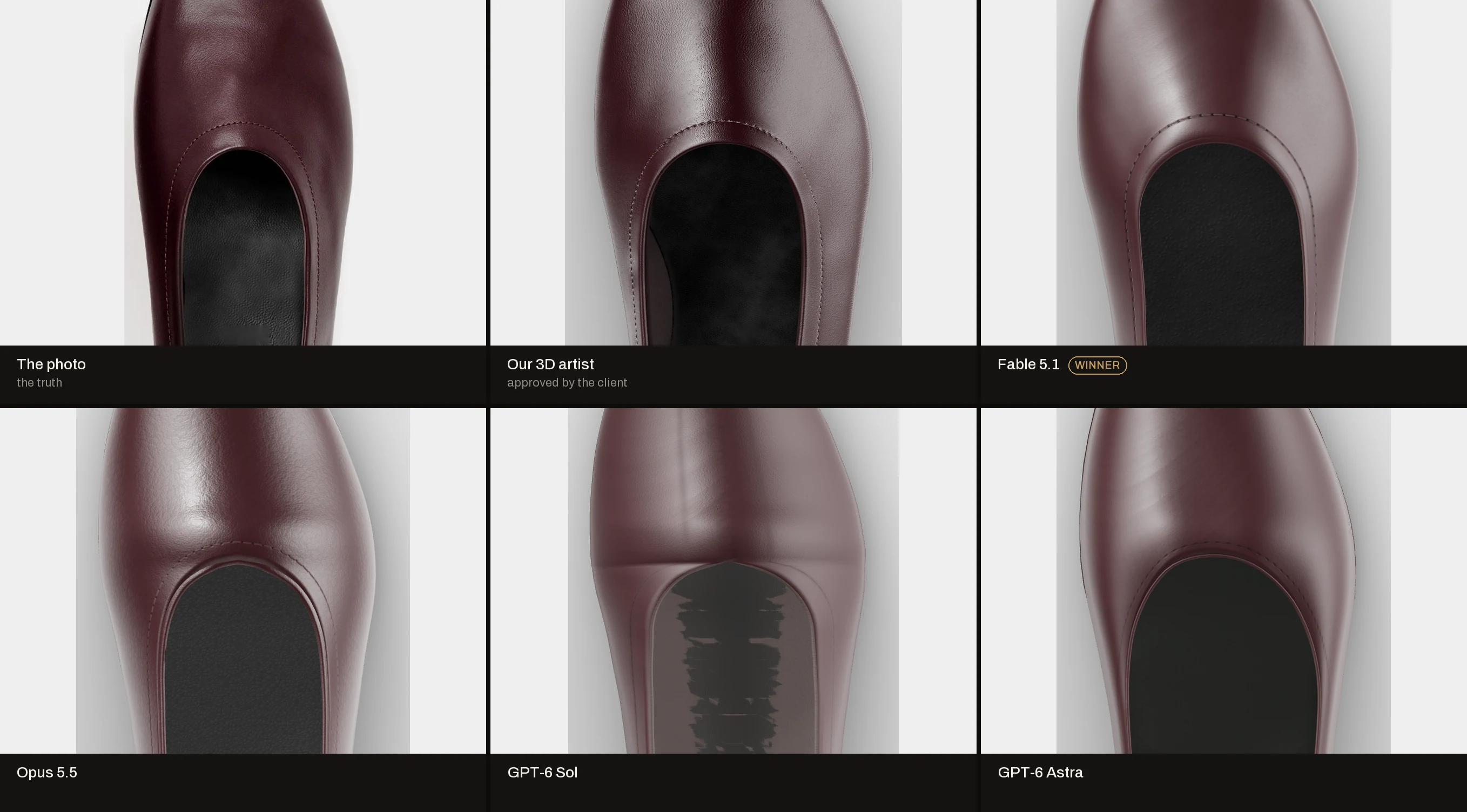
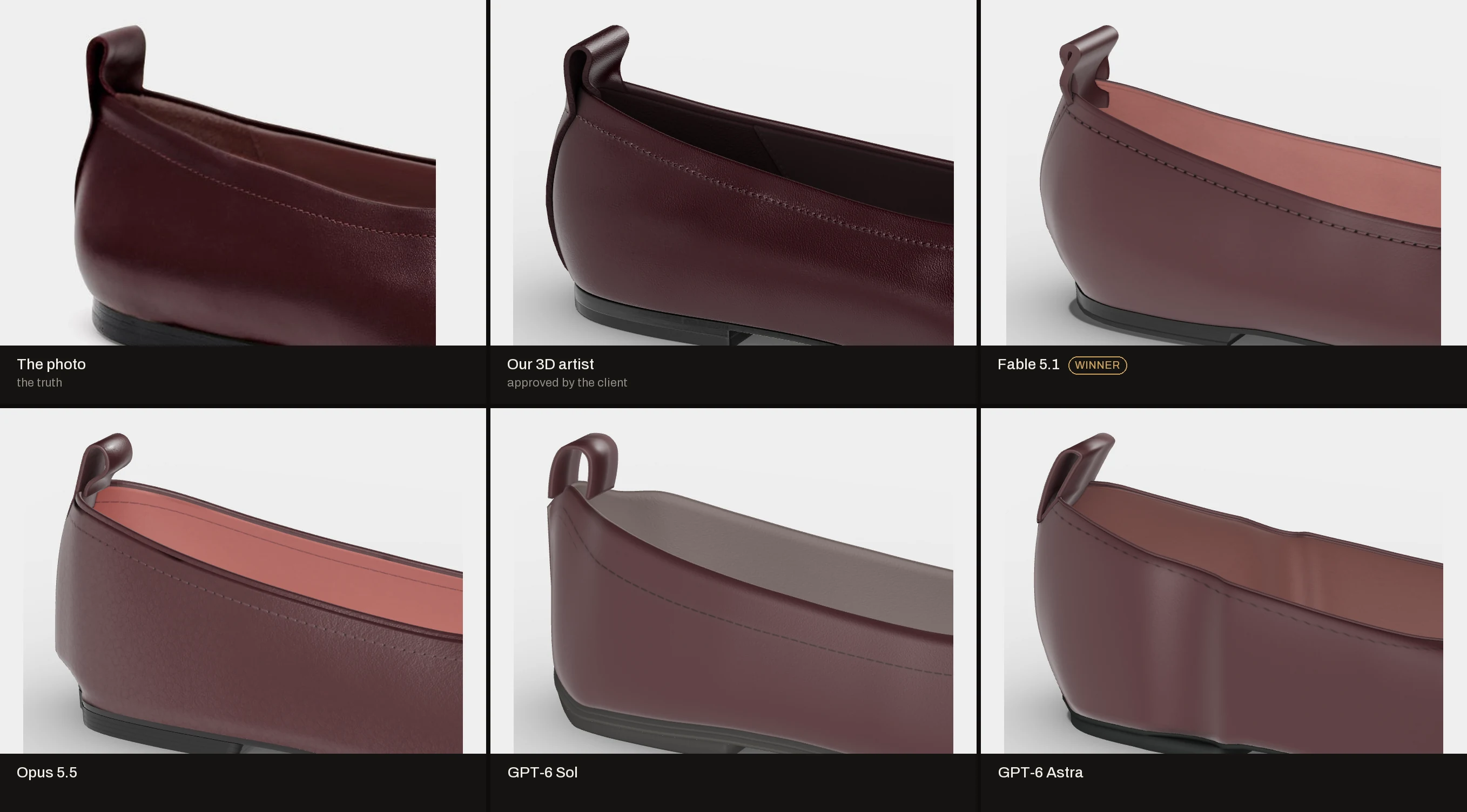
Put the shoes side by side and you see the surface first. Our artist's leather has a grain that catches the light, soft creases and a stitch line with modelled thread. The AI shoes are too even. They look lacquered, not worn.
Opus 5.5 comes closest on grain. On the toe it looks almost like ours. Fable 5.1 has the cleanest shape and a clear stitch line, but its leather is smooth. GPT-6 Sol leaves a crease across the front and a hard edge at the heel. GPT-6 Astra leaves a fold along the side and the heel.
Colour tells the same story. We gave all four the exact colour of our artist's texture. The scene is lit for our artist's material. In it, the colour saturation is 0.22 for the photo and 0.25 for our artist. The AI shoes come out paler and greyer, at 0.13 to 0.14. The same colour code does not give the same leather. Colour lives in the material and the light, not in a number.
The configurator
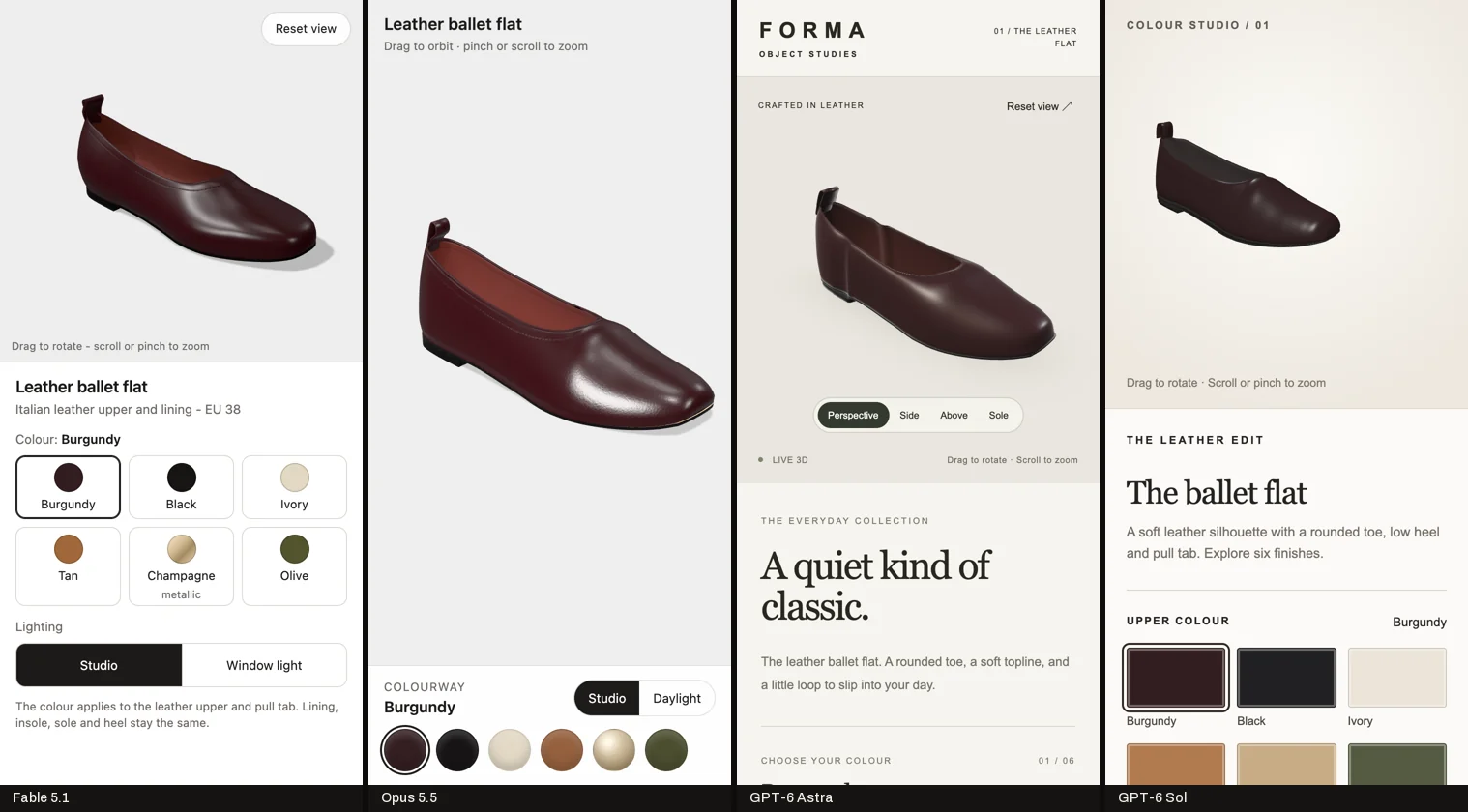
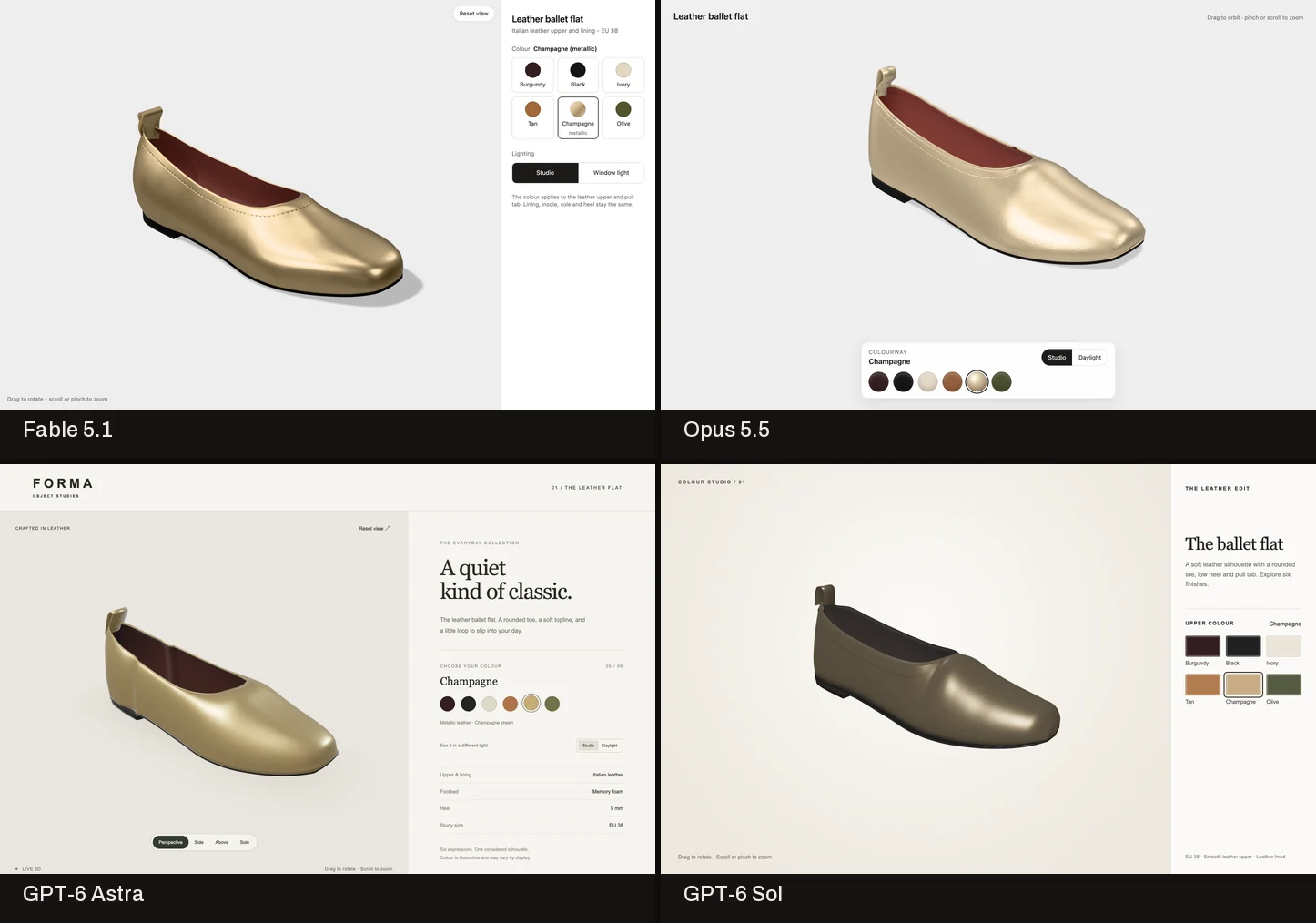
We opened all four pages ourselves, on a desktop and at phone width. All four work. Six colours run from one control. No second download, no errors and no sideways scroll on a phone. The textures stay on the shoe in every colour, metallic Champagne included.
A simple setup like this is easy work for AI. Each model picked its own layout. GPT-6 Astra also built a brand page around the shoe, with a name and a tagline.
What it took
Round one plus round two, measured on the same machine. We did not time our artist on this shoe, so we leave that bar out rather than guess.
We ran the test on flat monthly plans: Claude at $200 and ChatGPT at about €100 a month. So we also ask what it costs at pay-per-token API prices. The token counts come from each model's own logs. All four models, both rounds: $86.
Two things stand out. Opus 5.5 costs less per token than GPT-6 Astra, yet it cost more in total. It read 71 million tokens of its own history back from cache. And round two cost two to four times round one for every model. Round two bought quality, and it was not free.
GPT-6 Astra
46 min
14 min + 32 min
Opus 5.5
1 h 42 min
37 min + 65 min
GPT-6 Sol
1 h 43 min
51 min + 52 min
Fable 5.1
1 h 45 min
34 min + 71 min
| At API prices | Round one | Round two | Total | Score |
|---|---|---|---|---|
| Fable 5.1 | $12.40 | $21.71 | $34.11 | 7.6 |
| Opus 5.5 | $9.02 | $17.13 | $26.15 | 7.2 |
| GPT-6 Astra | $3.53 | $13.73 | $17.26 | 6.1 |
| GPT-6 Sol | $1.90 | $6.40 | $8.30 | 6.7 |
| All four | $26.85 | $58.97 | $85.82 |
What the models did that we did not ask for
Opus 5.5 saved five renders outside its folder. It reported this itself. GPT-6 Sol got the wrong brief from us: we pasted another model's folder by mistake. It noticed, said so and stayed in its own folder. GPT-6 Astra invented a brand. At the 25 measured sections, Fable 5.1 hit our sheet to 0.04 mm. It follows the numbers it gets, exactly. Each of these is small. You only find them if you check.
How we price it: token counts from each model's session logs (Claude Code and Codex), times the public API price per million tokens on 28 September 2026. Fable 5.1: $10 in, $50 out, $0.25 cache read. Opus 5.5: $4, $20, $0.20. GPT-6 Astra: $10, $50, $1. GPT-6 Sol: $2, $10, $0.20. Two things can raise these numbers. Claude may bill cache writes at the one-hour rate (Fable up to $44, Opus up to $31). OpenAI adds a surcharge on requests over 272K tokens (Astra up to $33, Sol up to $16). We do not publish our own artist's cost.
The scorecard
These are our scores, after round two. Two rows follow the measurements. The rest is our judgement. Our artist's model is the reference, so we do not score it.
How we score
- 1 to 2 Unusable. Would embarrass the brand if a customer saw it.
- 3 to 4 Recognisable, but would not pass a client review.
- 5 to 6 Usable after real rework by an artist.
- 7 to 8 Client-ready after minor fixes.
- 9 Near perfect. We would ship it after a final polish.
- 10 Measured perfect, or indistinguishable from what we deliver.
| Out of 10 | Fable 5.1 | Opus 5.5 | GPT-6 Sol | GPT-6 Astra |
|---|---|---|---|---|
| Shape, against the photos | 9 | 8.5 | 8.5 | 8.5 |
| Shape, against our artist | 9.5 | 9 | 8.5 | 8 |
| Leather surface | 4 | 6 | 4 | 3 |
| Details: stitching, tab, sole | 6 | 6 | 5 | 4 |
| Clean geometry | 8 | 7 | 5 | 4 |
| Configurator | 8 | 8 | 8 | 8 |
| Followed the brief | 9 | 6 | 8 | 7 |
| Overall | 7.6 | 7.2 | 6.7 | 6.1 |
Round one would score 2 on the surface for all four.
What this does not prove
- One product, one run per model per round. Next week brings a different product.
- In round two the models had our artist's measurements. A brand without an approved model cannot send those.
- A product photo cannot measure a shoe closer than a few millimetres. Every model here sits inside that range, ours too.
- No photo shows the front or the back, so every model guesses that shape, ours included.
- We judged the AI builds ourselves. Read it knowing who wrote it.
Questions people ask
- Can AI make a 3D model from product photos?
- Yes, for the shape. From four product photos of a leather ballet flat, four AI models built a 3D shoe in Blender in 14 to 51 minutes. After one round of client feedback, with 25 measured cross-sections of our artist's model, the best of them matched the photos as closely as our artist's model. The leather surface still did not look real.
- How accurate is an AI 3D model made from photos?
- In our test, after it got 25 measured cross-sections of our artist's approved model, the best model sat 1.57 mm on average from it. It matched the side photo with an outline overlap of 0.957, against 0.955 for our own model. A product photo cannot tell you much more than that, because of perspective and lens.
- Can AI make textures for a 3D product model?
- Only when you ask for them. In round one none of the four models made a texture, because our brief did not ask. In round two all four drew UV maps and textures in code: leather grain, a stitch line and the stamp on the sole. The grain still looked too even next to real leather.
- How long does AI take to model a shoe in 3D?
- Between 46 minutes and 1 hour 45 minutes across two rounds in our test, with a working colour configurator. GPT-6 Astra was the fastest and Fable 5.1 the slowest. The slowest scored best.
- How much does it cost to have AI make a 3D model?
- In our test, at public API prices, one shoe with a working colour configurator cost $34 with Fable 5.1, $26 with Opus 5.5, $17 with GPT-6 Astra and $8 with GPT-6 Sol, across two rounds. We measured it from the models' own token logs. On a flat monthly plan the run cost nothing extra.
- Is an AI 3D model from photos good enough for a product page?
- Not on its own yet. The shape and the colour configurator were close to ready. The leather, which is what a customer looks at up close, still read as a render. A person still has to judge and fix the surface against the real product.
What to take away
From four photos, with our artist's measurements in round two, the best AI model reaches the shape of a shoe as closely as a photo can show it. Fable 5.1 came closest. GPT-6 Astra was the fastest and GPT-6 Sol the cheapest. None of them got the leather. The shape is close to solved. The surface is not.
Next episode
Your product, next?
We build one product per episode. Suggest the product you would like to see, or request a free 3D model of your own product, made by our team, no strings attached.
Request a free 3D model →Stefan Stojiljković, founder of Teatika