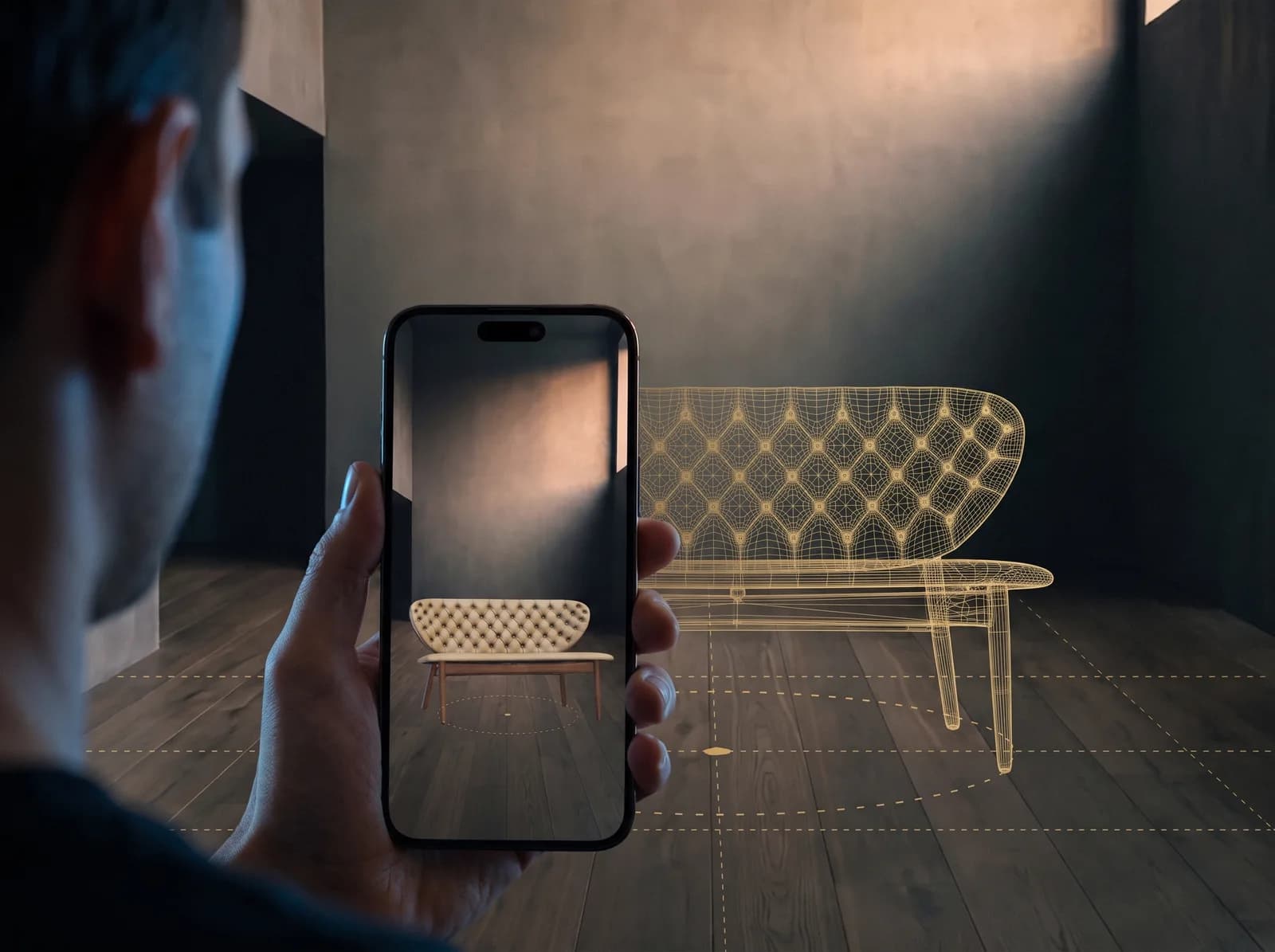
The same model, at true size, in the customer's room.
What your customer does
Taps 'View in your space', points the phone at the floor, and sees the sofa against their own wall, or the bag on their own table, at the size it really is.
What you get
True size, because the model is built in metres
Every model is built 1:1 to the official measurements. A five percent error is visible in a room, so the measurements are agreed before modelling starts, not checked after.
iPhone and Android from one file
iOS opens it in Quick Look, Android in Scene Viewer. Both from the same model that turns on your product page. No app, no download, no account.
The variant they chose
On a phone the button launches AR directly with the current colour or configuration. On a desktop it opens a lifestyle photograph and a QR code for that exact variant, so the phone picks up where the desktop left off.
What ships to you
- Platforms
- iOS Quick Look and Android Scene Viewer. Nothing to install.
- Input
- The same GLB as the web model; USDZ is produced from it
- On a desktop
- A modal with a lifestyle photograph and a QR code for the current variant
- Scale
- 1:1, metres, floor at zero
- Cost
- Included with the model. AR is not a second product.
- Ownership
- Hosting, new options and every small change are in the monthly plan. The code, models and source files become yours once the plan is paid off.
How it is built
Measurements first
We agree the source of the measurements before we model. The catalogue, a technical drawing, or the piece on your table.
One model, two formats
The web model is built once. USDZ for iOS is produced from it, so the two never drift apart.
Checked in a real room
On an iPhone and an Android phone, on a floor, next to a real object of known size.
The button in your store
Placed where the gallery is, in your store's style, wired to the variant the customer is looking at.
Questions we get before the first model
Do customers need to install an app?
No. iPhone and Android both open the model in the viewer that is already on the phone. One tap on your product page, and the piece is on their floor.
What happens on a desktop?
A desktop has no camera to point at a floor, so the button opens a lifestyle photograph and a QR code for the variant on screen. The customer scans it with a phone and continues there.
Is the size accurate?
Yes, because the model is built in metres to the official measurements, with the floor at zero. This is why we ask for the measurements before we start: a sofa that is five percent too narrow looks wrong in a room even when it looks fine on a screen.
Can they see the variant they configured?
Yes. The AR button takes the current colour or configuration with it. Where a configurator has more combinations than files, the chosen build is exported on the spot and handed to the phone.
Which products make sense in AR?
Anything bought for a space or for a size: furniture, lighting, luggage, a bag next to the one they already own. For jewellery and watches the web model does the work; AR adds less there and we say so.
Does AR need a separate model?
No. The same file turns on the page and stands in the room. That is one of the reasons we insist on building the web model properly: it is also the AR model.
Read before you decide
Send the product page. We will put the piece in a room and send you the link to try on your own phone.
Show us your best seller
Send a message, or ask for a free 3D model of one product, no strings attached.
- Address
- Belgrade, Serbia
- Contact
- hello@teatika.com